Geometry Dash Wave 3D overview
Geometry Dash Wave 3D is a fast-paced arcade game where I steer a zigzagging wave through tight neon paths, sharp traps, and increasingly difficult maps.
I immediately noticed how the 3D presentation gives the familiar wave gameplay a fresh look. The bright neon visuals, energetic music, and narrow flight paths make each run feel intense, especially when the spaces start to feel tighter.
How to play
In Geometry Dash Wave 3D, the controls feel very responsive, which I think is important for a game this fast. There is almost no room for delayed reactions, so I always know that my timing is the reason for a successful move or a crash.
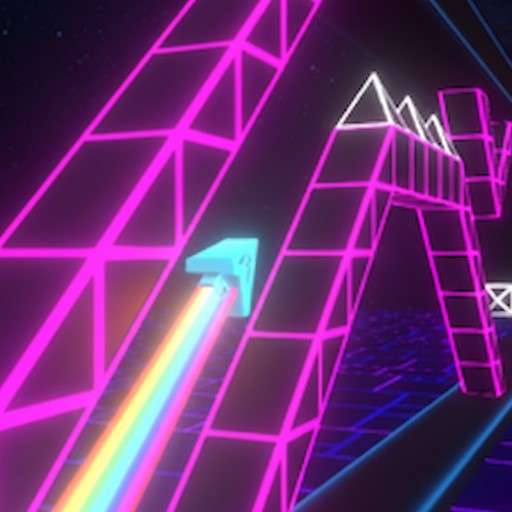
Hold the Arrow key or tap to fly upward
To control the wave, I use:
- Hold the Arrow key or tap to fly upward.
- Release to let the wave move downward.
- Alternate between holding and releasing to create a continuous zigzag path.
- Avoid spikes, saws, and moving obstacles.
I have to combine quick reflexes with accurate timing while keeping the music rhythm in mind. If I enjoy this kind of fast reaction-based gameplay, Geometry Vibes is another title I can try for a similar focus on rhythm, movement, and precision.
Three maps to master
Geometry Dash Wave 3D has three main maps, and I like how the difficulty gradually increases instead of becoming overwhelming immediately.
Map 1 and Map 2
These are the best places for me to build confidence. The paths still require concentration, but they give me enough space to understand how the wave moves and how quickly I need to react.
I also try to collect coins whenever I can. They are optional, but grabbing them gives me another reason to replay a map and improve my route.
Map 3
Map 3 is where the real pressure begins. The passages become narrower, the speed increases, and there is very little room to correct a bad movement.
I have to stay completely focused because holding the control for too long can send the wave directly into a spike. At the same time, releasing too early can cause me to drop into another obstacle.
FAQs
How do I control the wave in Geometry Dash Wave 3D?
Hold the control to move upward and release it to move downward, creating a continuous zigzag trajectory.
How many maps are available in Geometry Dash Wave 3D?
There are three main maps, with each one increasing the speed, precision, and complexity of the challenge.
Are there similar games to Geometry Dash Wave 3D?
If I enjoy this game, I can also try other arcade and rhythm-based obstacle games such as Geometry Dash Lite, Geometry Dash Meltdown, and Geometry Dash World.